
Keep your GLP-1 journey in one clear spreadsheet.
Record doses, daily food and symptom notes, weight, BMI, and progress toward a goal you set. Make your own blank Google Sheet or download the Excel file.
A Google account is needed to make a Sheets copy. The Excel download needs no sign-in and also opens in Apple Numbers.
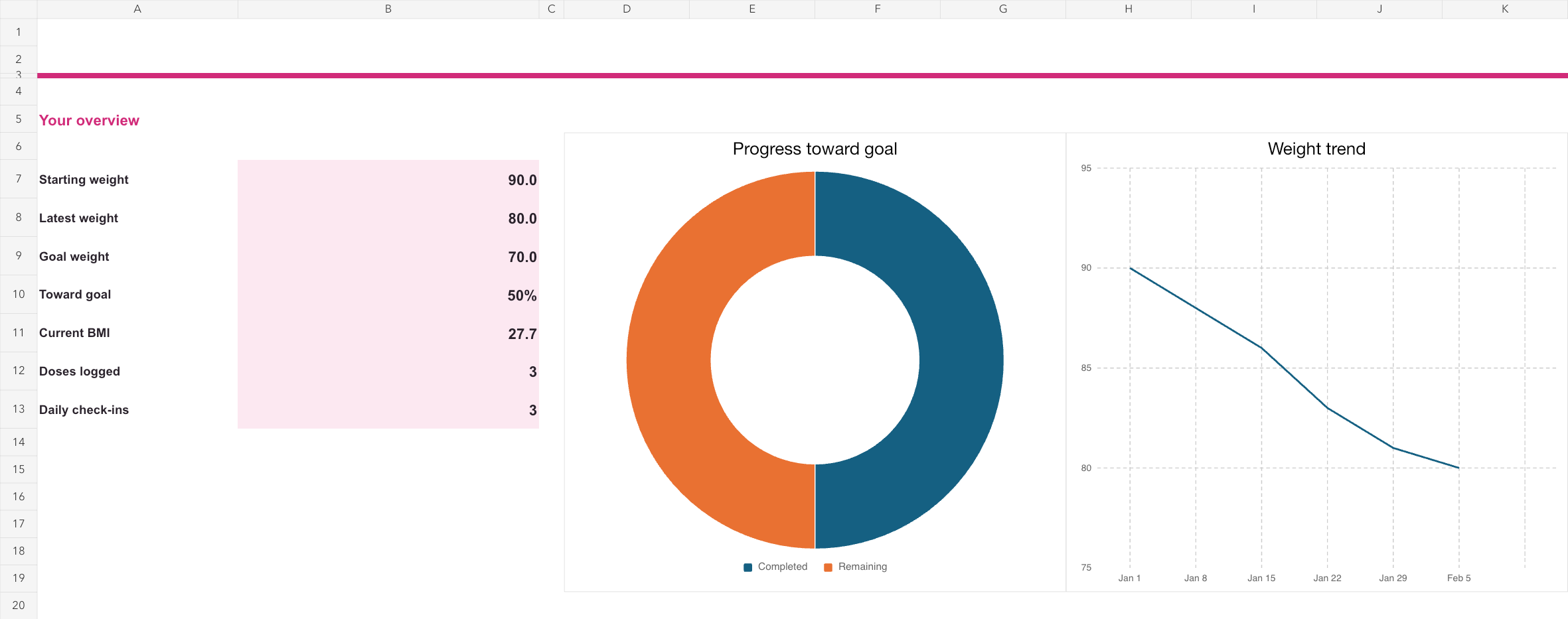
What’s inside
Dashboard
See starting and latest weight, progress toward your own goal, BMI, dose count, daily check-ins, and charts together.
Dose log
Record medication, the amount and unit you actually took, the route, injection site when relevant, and notes.
Daily check-in
Optionally note protein, fiber, water, appetite and food observations, and symptoms. Leave any field blank.
Weight progress
Enter your height, preferred units, and personal goal. Add weights over time to update the dashboard and BMI figures.
How to use it
- Make your own blank Google Sheet, or download the Excel version.
- Set your height, units, and personal goal on the Weight Progress tab.
- Enter weights in consecutive rows, then log doses and daily details when useful to you. Your dashboard will update from those entries.
BMI is a screening measure, not a diagnosis. The template records what you enter; it does not calculate a medication dose or replace guidance from your clinician. The spreadsheet does not sync with GLP AI.
Prefer tracking on your phone?
GLP AI lets you log doses, symptoms, weight, and meals in an app. It also offers reminders, a limited try of Meal Score and the AI coach, with full access in Premium.